Works as soon as you run the project
No API keys. Public market data streams into the app automatically.
- Chart candles and indicators
- Markets list with live prices
- Order book (depth)
- Trade tape (recent trades)
Case studiesLive implementation
A trading-style layout you can run locally in minutes: live Binance chart, markets sidebar, depth book, and a trade panel. Download the zip, edit React files, and grow it into your own product.
Try the finished UI first — same layout you get in the downloadable starter. Orders are simulated; market data is live.
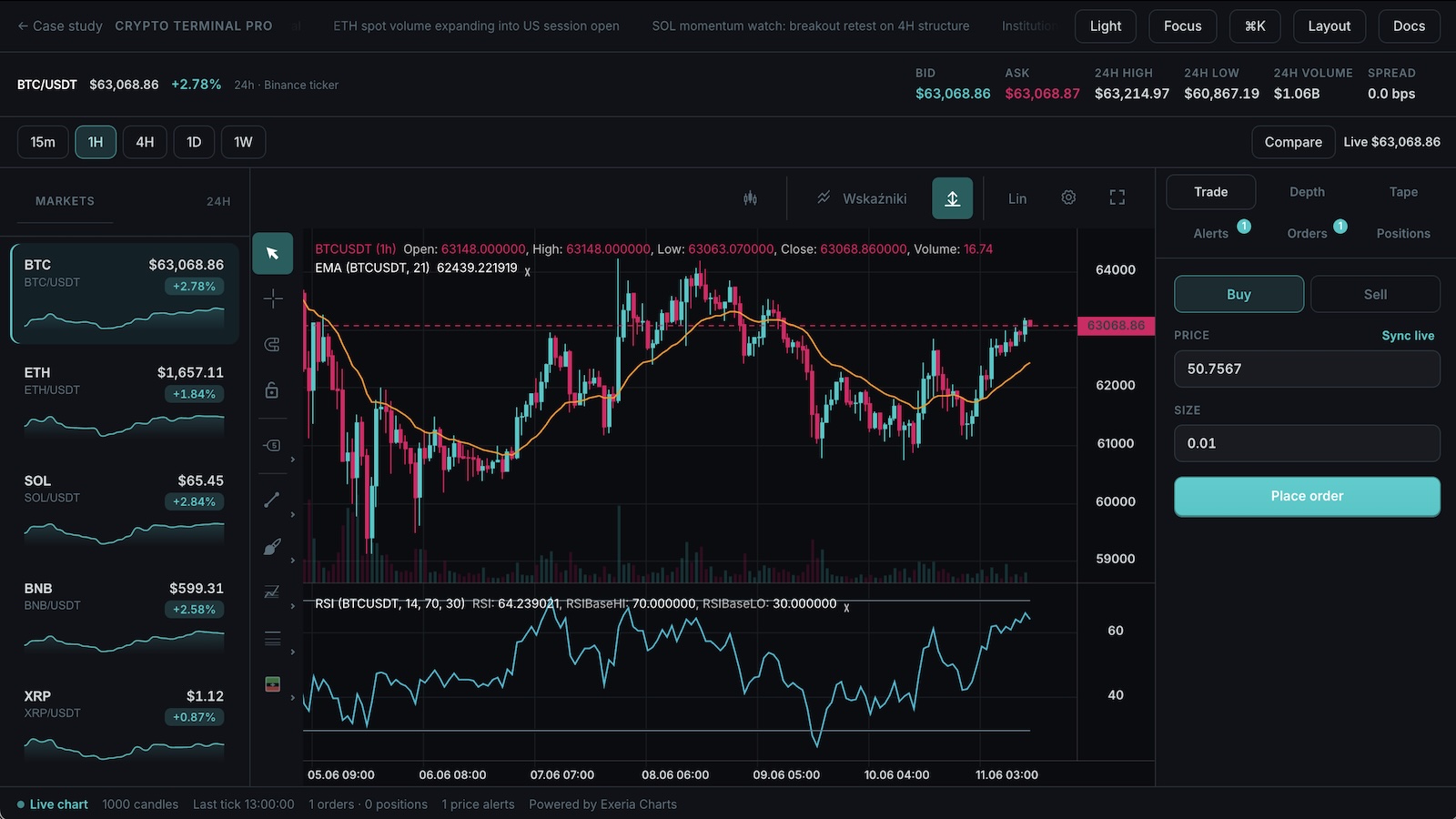
This page is your starting point: try the demo, download a small React project, run it on your machine, then change whatever you want. You do not need to understand the whole codebase on day one — follow the steps below and edit one file at a time.
New to React or charting? Follow this path once. After that, vibe-code whatever you want on top.
Open the live terminal in another tab. This is what you are building — chart, markets, depth, and a trade panel. No install yet.
Scroll to Starter code below and click Download ZIP. You get a ready-made Vite + React project — no need to clone this docs repo.
Unzip the folder, open your terminal app (Terminal on Mac, PowerShell on Windows), cd into the folder, and run npm install. You need Node.js 18+.
Run npm run dev. Your browser will show a local URL (usually http://localhost:5173) — open it. The chart should load with live Binance prices.
Open src/App.tsx in Cursor, VS Code, or any editor. Change a color, symbol, or label — save the file and the page updates automatically. The snippets/ folder has extra copy-paste examples for data and trading.
Prefer the browser? Use StackBlitz below — same project, no unzip step.
The starter is a real trading UI with real market data. Trading execution is fake on purpose — so you can experiment safely before connecting your broker.
No API keys. Public market data streams into the app automatically.
Orders and positions live in browser memory. Great for UI tweaks and flows.
Replace the simulated order logic with your backend or broker API.
Download a zip, or copy a snippet into your own app. The zip includes src/App.tsx plus extra examples in snippets/.
Pick one example to view or copy:
Chart plus toolbar, themes, and drawing tools.
import { useEffect, useRef, useState } from "react";
import { createChart, type ChartInstance } from "@efixdata/exeria-chart";
import { ChartUI } from "@efixdata/exeria-chart-ui-react";
import { BinanceAdapter } from "@efixdata/connector-binance";

const SYMBOL = "BTCUSDT";
const INTERVAL = "1h";

export default function App() {
  const containerRef = useRef<HTMLDivElement | null>(null);
  const [chart, setChart] = useState<ChartInstance | null>(null);

  useEffect(() => {
    const container = containerRef.current;
    if (!container) return;

    let disposed = false;
    const adapter = new BinanceAdapter();
    const instance = createChart({
      container,
      instrument: { symbol: SYMBOL, description: "BTC/USDT" },
      themeVariant: "dark",
      dataAdapter: adapter,
    });

    instance.init();
    instance.setMainDrawMode("OHLC");

    void (async () => {
      await instance.loadData(SYMBOL, { interval: INTERVAL, limit: 1000 });
      instance.addScript("EMA");
      instance.addScript("RSI");
      instance.subscribeToUpdates(SYMBOL);
      if (!disposed) setChart(instance);
    })();

    return () => {
      disposed = true;
      instance.unsubscribeFromUpdates();
      adapter.disconnect?.();
      instance.destroy();
    };
  }, []);

  return (
    <main style={{ height: "100vh", background: "#0b0e14" }}>
      <ChartUI chart={chart}>
        <div ref={containerRef} style={{ width: "100%", height: "100%" }} />
      </ChartUI>
    </main>
  );
}# After downloading and unzipping the starter from this page: cd exeria-crypto-terminal # or whatever you named the folder npm install npm run dev # Open the URL printed in the terminal (usually http://localhost:5173). # Edit src/App.tsx — save and the browser refreshes. # ── Starting from scratch instead? ── # npm create vite@latest my-crypto-terminal -- --template react-ts # cd my-crypto-terminal # npm install @efixdata/exeria-chart @efixdata/exeria-chart-ui-react @efixdata/connector-binance # Paste a snippet from above into src/App.tsx, then: npm run dev